
Joining and Renewing Membership Questions
Click on the + symbol to expand each section.
Go to the Sign In page and click on Forgot Your Password? Or click on this link to reset it right now.
Enter in either the username or email associated with your account and an email will be sent to you containing a link to reset your password.
If a few minutes have passed and you have not received an email check your Junk or Spam filters. If you still do not see the email, contact website@wpgs.org with your membership details.
You do not need a PayPal account to pay by credit card. Instead, follow these steps to pay through PayPal as a guest:

Click on the Renew button and then select PayPal as your payment option and then click Renew Subscription button.
You will be directed to this screen:

Click on Pay with Debit or Credit Card.

Enter your email address and click on Continue to Payment. You will be brought to this screen:

Fill out this information and scroll down to the bottom of the page

Untoggle Save Info & create your PayPal account. Only then will you see the option to proceed as guest as shown below:

Then click Continue as Guest to complete your payment.
Once you have signed up for a joint membership, log in to your account and click on Account at the top right of the page (or click this link to go directly to the accounts page). Under the Membership tab, you will see the option to Manage Group.

On the next screen, write the email address of the second member in the Email(s) to invite box and then press Invite Members and enter in a Group Name (like a family name).

The secondary member will be sent an email where they can add their username and member details.
Sign into your account by clicking here. If your membership is within 60 days of expiration or has already expired, you will see the option to renew under the main navigation bar as seen here:

On the next page, first, click on your preferred payment method (by check or PayPal), then, click on Renew Subscription.
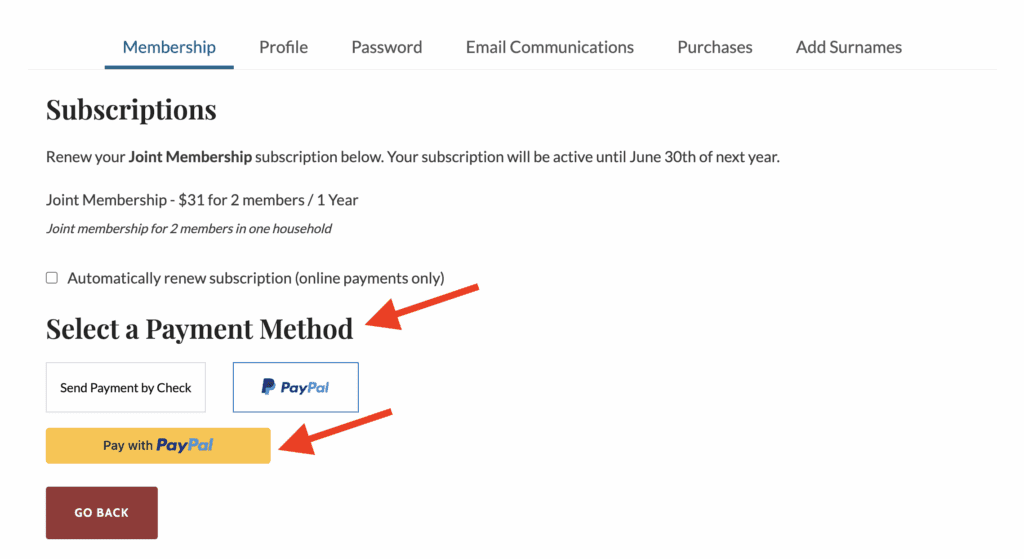
If paying by PayPal complete your transaction on the PayPal site. You will return to the WPGS site once your transaction is complete.
Once that is completed, you will be returned to your WPGS account page.
If you experience any issues or have any questions, please email: website@wpgs.org
If sending a check, please mail them to:
Membership
Western Pennsylvania Genealogical Society
4400 Forbes Avenue
Pittsburgh, PA 15213-4007
If your joint membership is set to expire at the end of the membership year, you must log in to the “Primary” user account to renew your joint membership. Once you are logged in you should see the option to renew under the main site navigation or if you click on the Account page.
If you were a member using our previous website, but your membership had expired before 2021, you will need to Join again and reenter your membership details, by going to our “Join” page.
Once you have completed that step, email membership@wpgs.org so that we can associate your old member number with your new online account.
There are several reasons why you do not see the option to renew your account:
- You already renewed your account for this membership year and it is not expired or within 60 days of expiring.
- You set your account up to Auto-Renew last year and it will renew when your current membership expires (June 30th).
- You are the secondary member on a Joint account. To renew a Joint Membership the primary person must log in and renew online.
If you have specific questions about navigating the website please email website@wpgs.org or your membership please contact membership@wpgs.org.
Login to your WPGS account and then click on this link: http://wpgs.org/membership/member/
On the Membership tab, scroll to the bottom, and it will say, “You are logged in as…” followed by your WPGS User Name.
Go to: https://wpgs.org/sign-in/ to sign into your account.
Once you have logged in, click on the Account button in the upper right side of your browser.
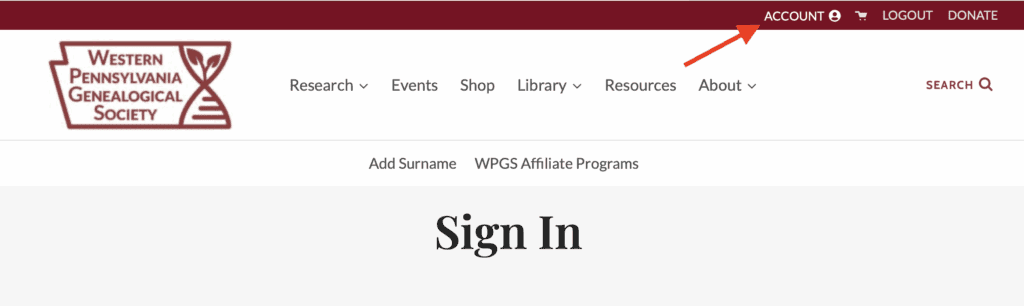
Click on the “Profile” tab and your member number will be on the page.
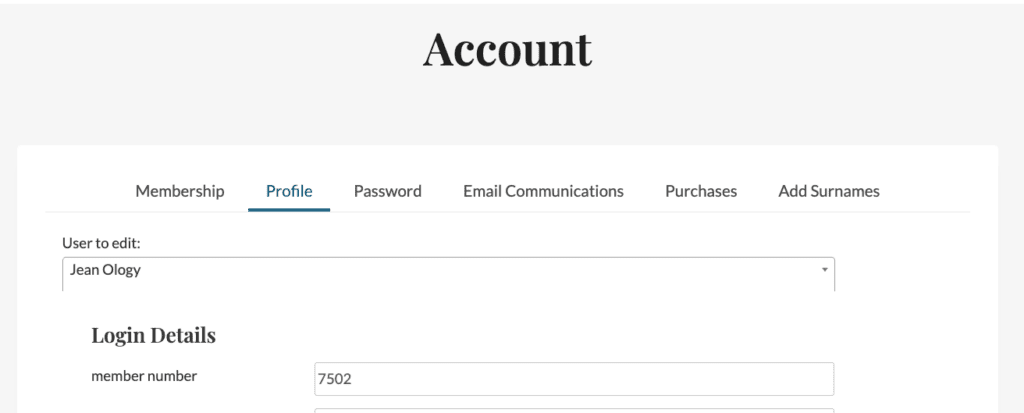
Go to: https://wpgs.org/sign-in/ to sign into your account.
Once you have logged in, click on the Account button in the upper right side of your browser.
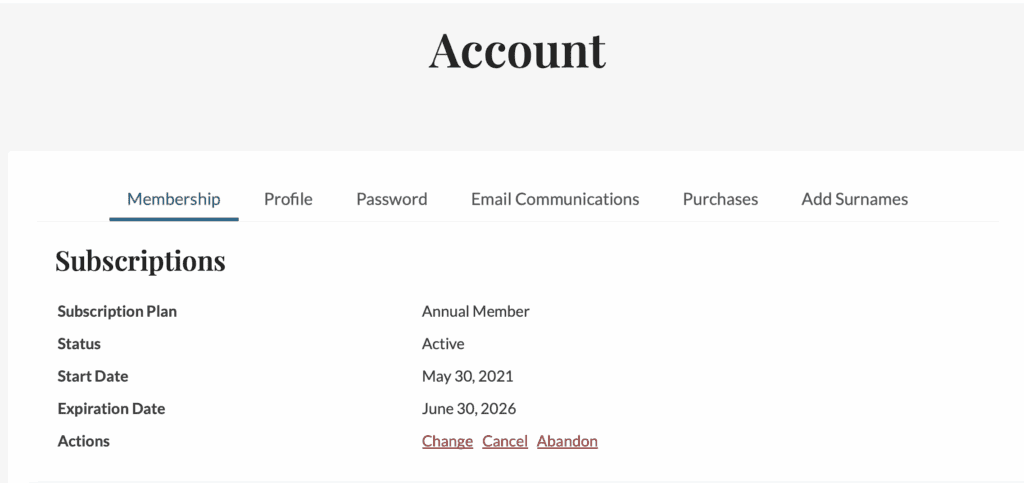
You can then see your account information and verify your membership type and expiration date.
The WPGS website does not store any payment information such as credit card numbers — that is handled securely by our payment processor. However, your member account does contain personal information including your name, mailing address, email address, and phone number. Two-factor authentication is an optional feature that adds an extra layer of protection to keep that information safe.
When you log in normally, you enter your username and password. With two-factor authentication turned on, you’ll also be asked for a short 6-digit code generated by a free app on your phone. This means that even if someone else learned your password, they still could not access your account without also having your phone.
What you’ll need: A smartphone and about 10 minutes. That’s it! · Is this required? No — this is entirely optional.
You’ll need a free “authenticator app” on your phone. This app generates the 6-digit codes you’ll use to log in. Choose any one of the three options below — they all work the same way. Google Authenticator is a popular and easy choice if you’re not sure which to pick.
To install: tap the link above for your phone type, then tap “Get” or “Install” in the app store. Open the app once installed — you don’t need to set up an account in the app to use it with WPGS.
Go to wpgs.org
Open a web browser on your computer and go to wpgs.org. You’ll see the WPGS homepage.

Click “Sign In” in the top-right corner
Look at the top-right of the page. Click the SIGN IN button.

Enter your username and password, then click “Log In”
Type your username (or email address) and your password in the fields shown. Then click the LOG IN button.

You’re now logged in — click “Account”
After logging in, the top-right corner will now show ACCOUNT and LOGOUT. Click on ACCOUNT.

You’re on the Account page — click the “Profile” tab
You’ll land on the Account page, which opens on the Membership tab. Look for the row of tabs near the top of the white box: Membership, Profile, Password, Email Communications, Purchases, Add Surnames.
Click the tab labeled Profile.

You’re now on the Profile tab
You’ll see your personal profile information at the top of the page — your email address, first name, etc. You don’t need to change anything here.
Scroll down toward the bottom of this page to find the Two-Factor Authentication section.

Find the “Two-Factor Authentication” section and check “Activate”
Scroll to the bottom of the Profile page. You’ll see a section titled Two-Factor Authentication with a checkbox next to the word Activate.
Click the checkbox to put a checkmark in it. More options will appear below it.

Add WPGS to your authenticator app
After checking Activate, you’ll see a Secret code and a QR CODE button. You need to add WPGS to your authenticator app using one of these two methods:
Method A — Scan the QR Code (easiest):
Click the QR CODE button on the WPGS website. A square black-and-white pattern will appear on your screen. Open your authenticator app on your phone, tap the + (plus) button or “Add Account,” then choose “Scan a QR code.” Point your phone’s camera at the QR code on your computer screen and it will be added automatically.
Method B — Enter the code manually:
In your authenticator app, tap + or “Add Account,” then choose “Enter a setup key” (sometimes called “Enter manually”). For the account name, type Western Pennsylvania Genealogical Society. For the key, copy the long code shown in the Secret field on the website and paste it into your app. Make sure “Time-based” is selected, then save.
Get the 6-digit code from your app and enter it in “Verify TOTP”
Once you’ve added WPGS to your authenticator app, the app will show a 6-digit number that changes every 30 seconds. This proves the app is connected to your WPGS account.
Look at the Verify TOTP field on the WPGS website. Type the current 6-digit code from your authenticator app into that box. No spaces — just the 6 digits.
Then click the CHECK button.

Click “Update” to save your settings
Once you see the green VALID confirmation, scroll down a little and click the UPDATE button to save everything.
Starting with your next login, you’ll see one extra step. Here’s what to expect:
Enter your username, password, and authentication code
When you go to sign in, you’ll now see a third field labeled Authentication Code on the login page.
Open your authenticator app on your phone, find the entry for Western Pennsylvania Genealogical Society, and look at the 6-digit number shown. Type that number into the Authentication Code field on the WPGS website.
Then click LOG IN as usual.

Need Help?
If you have any trouble setting up Two-Factor Authentication or get locked out of your account, please email the Website Committee Chair at website@wpgs.org.